If you no longer want to use your Xvideos account, you may decide to delete it permanently to protect your privacy and reduce your online footprint. Many users eventually choose to remove accounts from adult platforms to better manage their digital presence or simply because they no longer use the service.
In this guide, you will learn how to delete an X videos account step by step, understand why users often choose to remove their accounts, and find helpful links to manage the process easily.
What Is Xvideos?
Xvideos is one of the largest adult video streaming platforms on the internet. The site allows users to watch videos, create profiles, save favorites, and interact with certain features of the platform.
You can access the website here:
https://www.xvideos.com

When you create an account, the platform may store information such as:
- email address
- username
- preferences and saved videos
- activity history
Because of this stored information, some users later decide to delete their account for privacy or personal reasons.
Reasons to Delete Your X videos Account
Users may choose to delete their account for several reasons. Some of the most common include the following.
Privacy and Security Concerns
Many people prefer to limit the number of platforms that store their personal information, especially when it comes to sensitive or adult websites.
You can review the platform’s privacy policy here:
https://info.xvideos.com/legal/privacy
Reducing Your Digital Footprint
Deleting unused accounts helps reduce your overall online presence and potential data exposure.
Changing Personal Preferences
Over time, users’ interests and habits change. Some users simply decide to stop using adult entertainment platforms.
Managing Multiple Accounts
Some people create multiple accounts or forget their login details. In these cases, removing old or unused accounts helps keep things organized.
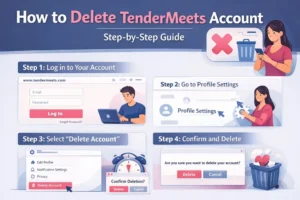
Step-by-Step: How to Delete Your X videos Account

If you have decided to delete your account, follow these steps carefully.
Step 1: Log In to Your Xvideos Account
First, visit the Xvideos website and log in with your credentials.
Login page:
https://www.xvideos.com/account
Enter your username and password to access your account.
Step 2: Go to Your Account Settings
After logging in:
- Click on your profile icon or username in the top corner.
- Select Account Settings or Profile Settings from the dropdown menu.
This section allows you to manage your account details and privacy options.
Step 3: Find the Delete Account Option
Inside the settings page, scroll down until you find the option related to account removal.
Look for something like:
Delete Account
or
Close Account

Click this option to begin the deletion process.
Step 4: Confirm the Account Deletion
The platform will usually ask you to confirm your decision before permanently deleting the account.
You may be required to:
- enter your password again
- confirm your choice
- optionally provide feedback about why you are leaving
Once confirmed, your account will be scheduled for deletion.
Step 5: Clear Your Browser Data (Optional but Recommended)
After deleting your account, it can be helpful to clear your browser history, cookies, and cache. This step removes stored login information and further protects your privacy.
Important Things to Know Before Deleting Your Account
Before you proceed with deleting your Xvideos account, consider the following points.
Account deletion is permanent
Once you confirm the deletion process, your profile, preferences, and saved content will be removed permanently.
You cannot recover a deleted account
If you change your mind later, you will need to create a new account from scratch.
Some data may be retained temporarily
Although your account will be removed, certain data may remain stored temporarily in system backups or archives for legal compliance purposes.
What Happens After Your Xvideos Account Is Deleted?
After the deletion process is completed:
- your profile becomes inaccessible
- your saved favorites and preferences are removed
- you will no longer be able to log in
If you decide to use the platform again in the future, you must create a new account.
Contact Xvideos Support for Assistance
If you cannot find the account deletion option or encounter technical issues, you can contact the Xvideos support team.
Support page:
https://info.xvideos.com/legal/tos
This page also provides additional legal information and policies regarding user accounts.
Final Thoughts
Deleting your Xvideos account is a simple but important step for users who want to manage their online presence more carefully. Whether your goal is to protect your privacy, remove unused accounts, or reduce your digital footprint, following the steps in this guide will help you complete the process safely.
Before proceeding, make sure you fully understand that account deletion is permanent and cannot be undone. Taking a few moments to review your account settings and confirm your decision will ensure a smooth and secure removal process.
Frequently Asked Questions
How can I permanently delete my Xvideos account?
To delete your Xvideos account permanently, log in to your account, go to Account Settings, and look for the Delete Account option. Follow the instructions on the screen to confirm the deletion request. Once completed, your account will be permanently removed.
What happens after I delete my Xvideos account?
After you delete your account, your profile, saved videos, preferences, and personal information will no longer be accessible. You will also lose the ability to log in using the same account details.
Can I recover my Xvideos account after deleting it?
No. Once you delete your Xvideos account, the process is usually permanent and cannot be reversed. If you want to use the platform again, you will need to create a new account.
Is my personal data removed after deleting my Xvideos account?
Most of your personal data will be removed from the platform’s active systems after account deletion. However, some limited information may be retained temporarily in system backups or archives for legal or security purposes.
Can I delete my Xvideos account without logging in?
In most cases, you must log in to your Xvideos account to delete it through the account settings. If you cannot access your account, you may need to contact the platform’s support team for assistance.