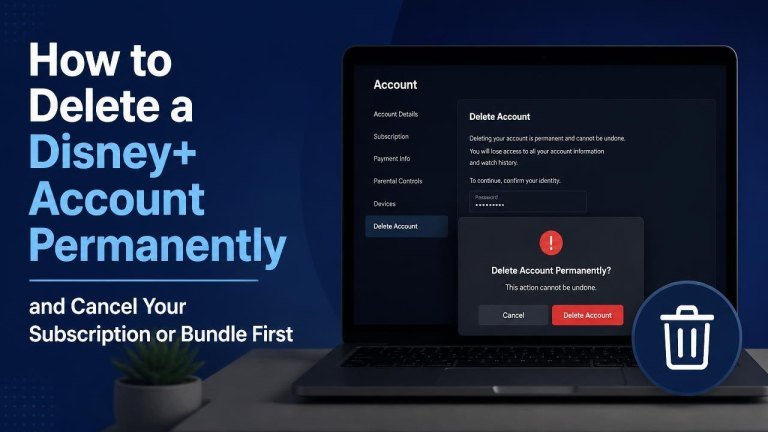
Deleting a Disney+ account permanently is different from simply canceling a subscription. Cancellation stops future billing, while account deletion is a separate privacy request that may remove your login, profiles, settings, and other associated information.
Before starting, identify who bills you for Disney+. Your cancellation steps may differ if you subscribed directly through Disney+, an app store, a mobile provider, a streaming bundle, or another partner.
Cancel your Disney+ subscription before deleting your account
Start by confirming your billing provider, reviewing the renewal date, and saving any confirmation email. Canceling first helps prevent another charge and may be necessary before Disney can process an account deletion request.
Cancel a subscription billed directly by Disney+
Sign in to Disney+ using a web browser, open your account or subscription settings, and select the option to manage or cancel your plan. Follow each confirmation step until the cancellation is complete.
Afterward, check the account page for a cancellation status or end-of-access date. Keep the confirmation details in case you need to contact support about future billing.
Cancel through Apple, Google, or another app store
If you subscribed through an app store, cancel the plan in that provider’s subscription settings rather than relying only on the Disney+ app. Confirm the canceled status and retain the receipt or reference number.
Removing the Disney+ app does not cancel an app-store subscription. You must manage the recurring payment through the same store account used when you subscribed.
Cancel a bundle or partner subscription
For a bundle that includes Disney+ or a subscription billed by a mobile, internet, television, or other partner, contact that provider or use its account portal. Ask specifically whether canceling Disney+ will affect the rest of the bundle, your other services, or any promotional pricing.
If the bundle is managed by a partner, Disney+ may not be able to cancel the recurring charge on your behalf. Wait for the partner’s cancellation confirmation before proceeding with account deletion.
Check your account before requesting deletion
Once billing is canceled, review your Disney+ account for active subscriptions, linked services, and important account data. Download or record anything you want to keep because permanent account closure may not be reversible.

- Save receipts, invoices, and cancellation confirmations.
- Review profiles and note any information you may need later.
- Check whether the same email address is used for other Disney services.
- Sign out of Disney+ on shared televisions, phones, tablets, and browsers.
- Remove saved payment details if the available account settings allow it.
Request permanent deletion of your Disney+ account
Use Disney’s official privacy, account-support, or help-center channel to request deletion. Sign in if required, choose the account deletion or personal-information request option, and provide the requested details. Include the account email, your cancellation status, and a clear request for permanent deletion request.
The exact request method can vary by location and account setup. Follow the instructions shown by Disney rather than using an unofficial contact form or a link from an unknown message.
Verify the deletion request
After submitting the request, look for a verification message or follow-up instructions. Complete any required identity verification and monitor your email inbox for a completion notice or additional questions.
Do not assume that uninstalling the app, removing a profile, or signing out deletes the account. Those actions affect access on a device but do not necessarily erase the underlying account.
What happens after account deletion?
Permanent deletion can remove or anonymize information associated with the account, such as profiles, preferences, and viewing activity. Some information may be retained when required for legal obligations, fraud prevention, or transaction records, depending on applicable policies and laws.
Account deletion may also affect access to related Disney services that use the same login. Review the deletion information carefully before confirming the request, especially if you use that email for other products.
If you are still being charged after cancellation
First, compare the charge with your billing provider, invoice details, and cancellation date. A pending charge may have been initiated before cancellation, while a later recurring charge may indicate that the subscription was managed through a different provider or bundle.
Contact the company shown on the payment statement and provide your cancellation confirmation. Avoid filing a payment dispute before checking the provider’s support process, unless you believe the charge is unauthorized.
Quick checklist for permanent Disney+ account deletion
Use this checklist to complete the process in the right order: cancel billing, verify the subscription end status, and submit the official deletion request.
- Identify who bills you for Disney+.
- Cancel the direct subscription, app-store plan, or partner bundle.
- Save written confirmation and review any remaining billing details.
- Record or download information you want to retain.
- Submit a permanent account deletion request through Disney’s official channel.
- Complete verification and keep the final response for your records.
Following these steps reduces the risk of continued billing and helps ensure that you are requesting account deletion only after your Disney+ subscription has been properly canceled.