Deleting a SHEIN account is straightforward, but it is worth checking your account first. Pending orders, active returns, unused coupons, and SHEIN wallet funds may need attention before you close the account, much like taking steps to protect your wallet funds.
This guide explains how to prepare your account, use or withdraw available value where possible, and complete the deletion process safely.
Before Deleting Your SHEIN Account
Account deletion may be permanent, and access to your order history or account benefits may not be available afterward. Review everything connected to your account before starting the request, including guidance to save your order records first.
- Check for pending orders and confirm their delivery status.
- Complete or cancel eligible orders before requesting deletion.
- Resolve any open returns and refunds.
- Review unused coupons and wallet balance.
- Save invoices, tracking details, and other records you may need later.
- Remove saved payment methods and review your account’s personal information.
How to Use Up Pending Orders First
If you have an order in progress, it is usually best to wait until the order is delivered and any return period or refund issue is finished. This protects your access to tracking information, customer support, and refund records.

Check Your Order Status
Open the SHEIN app or website and go to your order list. Select each recent order to check its shipping status, estimated delivery information, and available support options, as you would when deciding whether to cancel orders before you leave.
If an order has not shipped, review whether cancellation is available. If it has already shipped, waiting for delivery may be the most practical option. Keep screenshots or confirmation emails for important order details before deleting the account.
Finish Returns and Refunds
Do not close the account while a return, exchange, dispute, or refund is still unresolved. Complete the required steps and wait for confirmation of the return outcome or refund status.
Keep any return labels, courier receipts, and messages from support. These documents can be useful if you need to follow up after the transaction is complete.
How to Use SHEIN Coupons Before Deletion
Coupons generally have conditions such as a minimum purchase, product exclusions, or an expiration date. Open your coupon center and review each coupon’s expiration date, usage conditions, and eligible items.
Use a coupon only if you genuinely need to place another order. Avoid spending more simply to use a discount, especially when the coupon provides only a small saving or has restrictive terms.
Coupons may not be transferable, refundable, or recoverable after account deletion. If a coupon cannot be used sensibly before you close the account, treat it as a benefit that may be lost.
How to Handle Your SHEIN Wallet Balance
Review your wallet or account balance before deletion. A wallet balance may come from refunds, promotions, credits, or other sources, and the applicable redemption rules can vary by account and region.

Use the Balance on an Eligible Order
If the balance can be applied to a purchase, you may use it on an order you actually want. Check the checkout page carefully to confirm that the wallet credit is applied before placing the order.
Save the order confirmation and any remaining balance information. If the credit cannot be used at checkout, contact SHEIN support before submitting an account deletion request.
Ask Support About Unused Funds
Some balances may have specific restrictions, while others may be connected to refunds or promotional terms. Contact support through the official app or website and ask about the remaining balance, eligibility for use, and what happens after deletion.
Do not share your password or full payment details in an unsolicited message. Use only official SHEIN support channels and retain the conversation for your records.
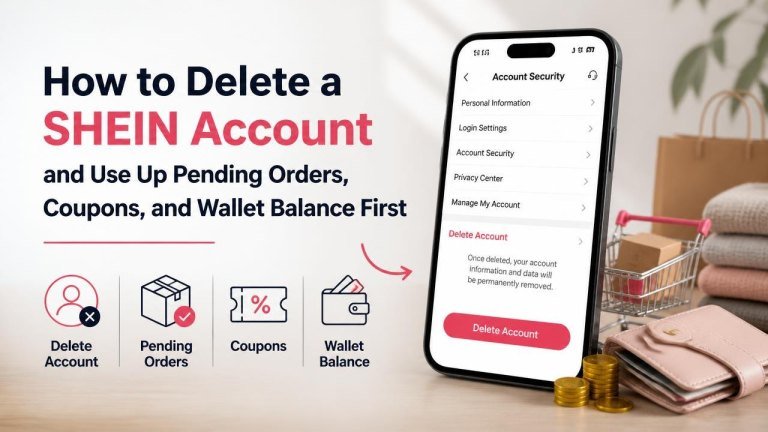
How to Delete a SHEIN Account
Once your orders, returns, coupons, and wallet balance are settled, sign in through the official SHEIN app or website. Look for the account, privacy, or security settings and select the option related to account deletion or closing your account.
- Open your account settings.
- Find the privacy, security, or account-management section.
- Select the deletion or account-closure option.
- Review the warnings and eligibility information shown on screen.
- Complete any identity or security verification.
- Confirm the request only after checking that you no longer need the account.
Menu names can differ between the app, website, country, and account version. If you cannot find the option, use the official help center or contact customer support for the correct route.
What to Save Before Account Closure
After deletion, you may lose access to information that is convenient to retrieve later. Save important receipts, tracking numbers, and support conversations before confirming the request.
- Order confirmations and invoices
- Return and refund evidence
- Warranty or product documentation
- Gift card or wallet information, where applicable
- Messages related to unresolved customer service matters
Only keep information you need, and store it securely. Remove downloaded files containing personal or payment information when they are no longer necessary.
What to Do If You Cannot Delete the Account
If the deletion option is unavailable, check whether you have an open order, unresolved refund, account restriction, or other pending issue. Resolve the issue first, then try again through the official account settings.
You can also contact SHEIN support and clearly explain that you want to close the account. Include the relevant order number if your request concerns a transaction, but avoid sending unnecessary sensitive information.
Final Checklist Before Deleting SHEIN
Use this final checklist to confirm that your account is ready for closure. The most important steps are checking orders, using eligible account value, and saving essential records.
- All orders are delivered, canceled, or otherwise resolved.
- Returns, exchanges, and refunds are complete.
- Useful coupons have been redeemed or consciously forfeited.
- The wallet balance has been used or discussed with support.
- Receipts and support records have been saved.
- Saved payment methods and personal details have been reviewed.
- You understand that account deletion may be permanent.
After completing these checks, submit the deletion request through the official SHEIN app or website. Keep any confirmation of the request until you are satisfied that the account has been closed.